When AI adoption stalls, the problem is rarely the technology. It is one specific barrier in how people change, whichever AI assistant you bought. With the right focus you can find it and recover in about 90 days.
This guide is for IT directors and CIOs whose AI adoption stalled after launching Microsoft 365 Copilot, ChatGPT Enterprise, Amazon Quick, Claude or Gemini. The tools differ, but the reasons adoption stalls do not. It shows how to diagnose where people are stuck using ADKAR, who should own the recovery, and a three month plan to get usage and value moving again.
The short version
- A stalled AI rollout is a people problem with a specific barrier point, whichever tool you use. Diagnose it before you relaunch anything.
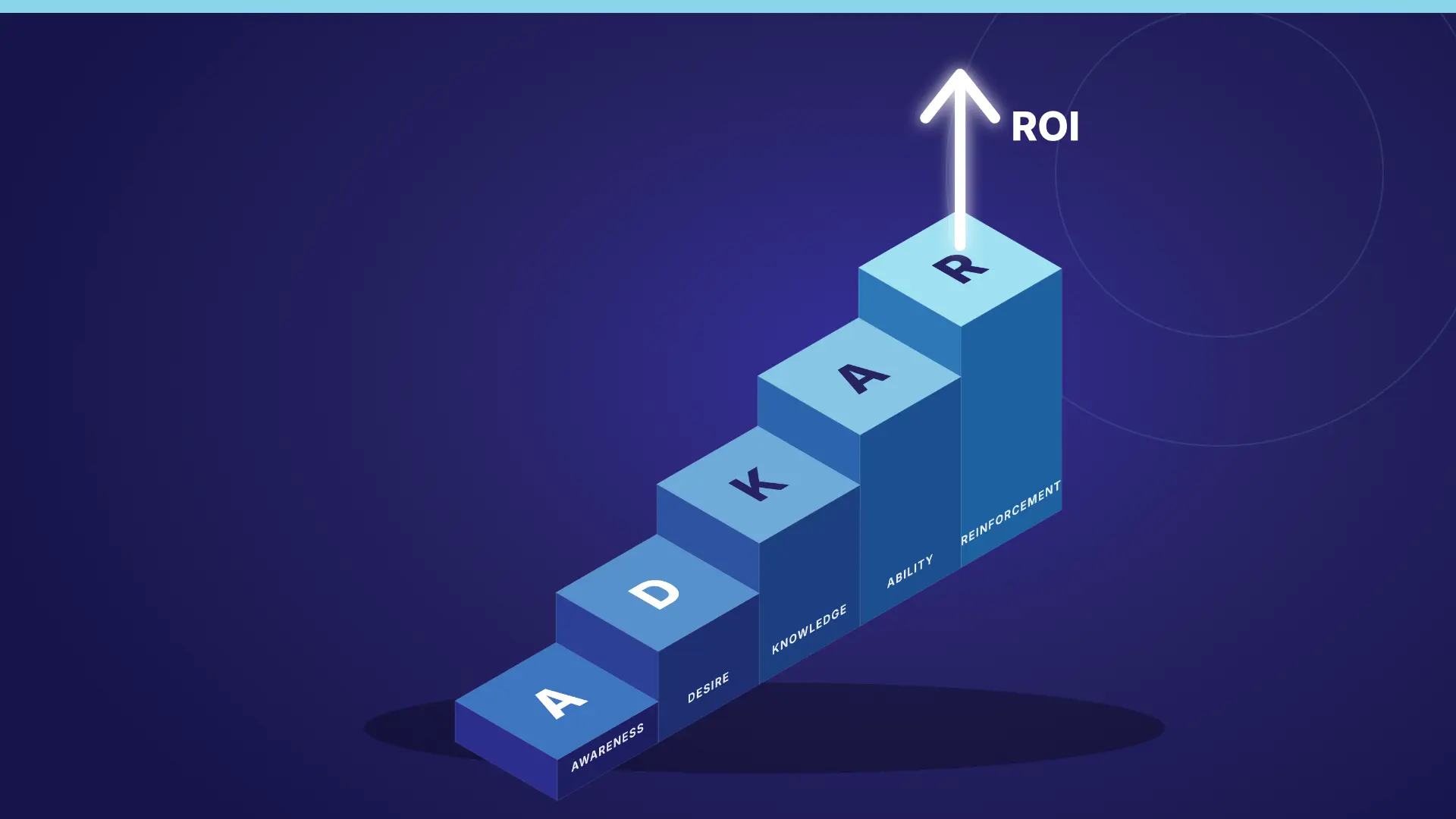
- ADKAR tells you where people are stuck: Awareness, Desire, Knowledge, Ability, or Reinforcement. Each needs a different fix.
- Recovery needs a named owner on the business side, not only IT.
- A focused recovery takes about three months: diagnose, relaunch around roles, then reinforce and measure.
- Measure habits and outcomes, not logins.
Why AI adoption stalls after launch
AI adoption stalls because launch activities create curiosity, not habits. The licences arrive, a kickoff runs, enthusiasts dive in, and everyone else returns to the old way of working.
The pattern is best documented for Copilot, but we see the same curve with every AI assistant. In a Gartner survey of 132 IT leaders reported by Computerworld, 60 percent had started Microsoft 365 Copilot pilots, but only 6 percent had finished and were planning large scale deployment. In the same survey, 57 percent said user engagement drops quickly after implementation, and 72 percent said employees struggle to fit Copilot into their daily routines.
Prosci's AI adoption research found that 63 percent of organizations cite human factors as a primary challenge in AI implementations, and that user proficiency accounts for 38 percent of reported AI adoption challenges. What we see in rollouts matches both: usage rarely stalls because the tool is weak. It stalls because nobody planned for what happens after training.
How to diagnose where your AI rollout is stuck
Diagnose before you act. The most common mistake is running another round of generic training, which only fixes a Knowledge gap. If the real barrier is Desire or Reinforcement, more training changes nothing.
ADKAR maps each symptom to a cause. Look at your usage data by team, then talk to 10 to 15 employees across a few departments. Their answers will cluster around one or two barrier points.
For a faster first read, take our free Copilot Adoption Scorecard. In about 10 minutes it places your rollout in a stage (launching, stalling, scaling, or embedded) and shows the ADKAR stage where adoption is stuck, with no admin access or usage reports needed.
| What you see in the data | ADKAR barrier point | What employees say | First fix |
|---|---|---|---|
| Many licensed users have never tried it | Awareness | "I didn't know I had it" or "I don't know why we bought it" | A sponsor message explaining why the organization invested and what it expects |
| Tried once or twice, then stopped | Desire | "It's not for my job" or "I'm worried about putting data in it" | Role specific benefits and a plain language usage policy |
| Uses it only for search or quick summaries | Knowledge | "I don't know what to ask it" | Role based use cases and hands on prompting practice |
| Knows how, but drops it under deadline pressure | Ability | "It's faster to do it the old way" | Practice on real work and building the tool into existing workflows |
| Usage rose, then fell after a few weeks | Reinforcement | "Nobody ever asked about it again" | Regular check ins, recognition, and visible measurement |
Different teams can sit at different barrier points, which is why a single organization wide relaunch rarely works. Check for security blockers too. Oversharing worries or restricted access show up as a Desire problem in surveys, but the fix belongs with IT and security, not training.
Who should own the recovery, and who to talk to
The question we hear most often is "our AI adoption is stalling, who should we talk to?" Recovery needs a small group inside your organization first, and outside help only where you lack capacity or expertise.
- Executive sponsor. A senior leader who explains why the investment matters and visibly uses the tool.
- Business owner. Someone outside IT who is accountable for adoption and value. IT owns the platform. The business owns the behaviour change.
- Platform owner. Provides usage data, licence assignment, and fixes for permissions and access.
- Change management or L&D lead. Runs the ADKAR diagnosis and designs the learning path.
- Security and compliance. Clears the data concerns that quietly suppress Desire.
Your vendor account team at Microsoft, OpenAI, AWS, Anthropic or Google can help with licensing and technical readiness. An adoption partner helps when you need a structured diagnosis or hands on sessions at scale. We compared both paths in AI Champions: Build Internally or Hire a Training Partner?.
Before you look at another tool, look at the licences you already own. Gartner research reported by Computerworld found that organizations average at least three AI assistants, and only 8 percent focus on one. Adding a tool to a stalled rollout usually makes it worse: more spend, more security questions, and more training. Unless there is a clear use case your current tool cannot cover, fix adoption of what you have first. Our comparison of Copilot, ChatGPT Enterprise, Claude and Amazon Quick helps if you are weighing that decision. For tool specific guidance, see How to Drive Adoption of Amazon Quick and How to Train Employees on Google Gemini.
A 90 day AI adoption recovery plan
Three months is enough to diagnose, relaunch, and build a habit, as long as each month has one clear focus and a checkpoint.
| Month | Focus | Key activities | Checkpoint |
|---|---|---|---|
| 1 | Diagnose and reset | Pull usage data by team, interview employees, run an ADKAR assessment, clear security blockers, send a sponsor message | Barrier point named for each major group, sponsor and business owner confirmed |
| 2 | Relaunch around roles | Hands on sessions using each team's real tasks, a shared prompt library, champions and a channel for questions and wins | Each pilot team uses at least three role use cases |
| 3 | Reinforce and measure | Regular check ins, recognition, fixes for remaining friction, comparison to the baseline | Share of weekly users rising in pilot teams, recovery report and a business as usual plan |
To run the plan well, follow these steps:
- Set a baseline in week one. Record active users, usage depth, and two or three business outcomes before you change anything.
- Pick pilot teams, ideally one per barrier point, instead of relaunching to everyone at once.
- Match the fix to the barrier. Sponsor messages for Awareness, role benefits for Desire, practice for Knowledge and Ability, follow up for Reinforcement.
- Build sessions around real work. Our Prompt a Thon workshops use each team's own documents and tasks, because practice on real work is what builds Ability.
- Review every two weeks with the sponsor, business owner, and platform owner, and adjust for any team that misses its checkpoint.
- Share wins publicly. A peer team's story, with the task, the before and the after, builds more Desire than any vendor statistic.
For more on choosing the right use cases, see Use Case Driven AI Adoption.
How to measure AI adoption recovery without counting logins
Measure whether people formed a habit and whether the work got better, not whether they logged in.
Every major platform gives admins more than logins. Treat "active user" as a floor, not a goal, and look for the habit signal each one offers.
| AI assistant | Where to find usage data | Best habit signal |
|---|---|---|
| Microsoft 365 Copilot | Copilot Dashboard in Viva Insights | Usage levels from novice to power user (active means one activity in 28 days) |
| ChatGPT Enterprise | Workspace analytics | Power users, and use of GPTs, projects and connectors |
| Amazon Quick | Amazon Quick analytics dashboard | Weekly active users, plus spaces, agents and flows created and used |
| Claude | Usage analytics for Team and Enterprise plans | Weekly active members against assigned seats, adoption level and stickiness |
| Gemini for Google Workspace | Gemini usage reports in the Admin console | Usage level by user (high, medium, low, zero) and adoption by app |
Track three layers each month:
- Habit: the share of licensed users who use the tool weekly, and the share who are power users.
- Depth: use beyond search and summaries, such as drafting, analysis, agents, custom GPTs, Quick flows, Claude projects, or AI inside Excel, Sheets and PowerPoint.
- Value: two or three business outcomes your sponsor cares about.
Add a short ADKAR pulse survey to check whether the barrier point you diagnosed in month one is moving. Retaking the scorecard at the end of each month is a simple way to track it, and What Good Copilot Adoption Actually Looks Like covers targets that apply to any assistant.
The rule we give clients is simple: diagnose before you relaunch, fix the barrier before you retrain, and measure habits before you buy another tool.
Callout: A stalled AI rollout is like a car that will not start. Another training session is a fresh coat of paint. Find out whether it is the battery, the fuel, or the key, then fix that.
What IT leaders should do next
- Take the Copilot Adoption Scorecard to see your stage and weakest ADKAR stage in about 10 minutes.
- Pull usage data by department and identify where adoption stalled.
- Interview 10 to 15 employees and map their answers to an ADKAR barrier point.
- Confirm an executive sponsor and a business owner for the recovery, not only IT.
- Ask security whether access restrictions or oversharing concerns are suppressing use.
- Set a baseline for habit, depth, and value before you relaunch anything.
- Book a review every two weeks for the next 90 days.
How Change Champions helps
Change Champions Consulting has helped more than 500 organizations and 60,000 users adopt new technology, using PROSCI and ADKAR to focus on the people side of change. When AI adoption stalls, we help you find the real barrier and build a recovery that lasts.
- Adoption diagnosis: usage data review, employee interviews, and an ADKAR barrier assessment
- Hands on sessions: Prompt a Thons, Show Me sessions, and Let Me Try workshops built on real work
- Champion networks and measurement frameworks that outlast the project
Learn more about our AI enablement services, Microsoft Copilot adoption services and change enablement.
Ready to turn rollouts into real adoption?
Whether you're driving Microsoft 365 and AI adoption, reducing human risk, or leading a change program, a 30 minute discovery call is the fastest way to see if we're a fit.